
Wild Tokyo App 2026 — How to Get Wild Tokyo Casino on iOS & Android
Wild Tokyo Casino on Mobile — Two Ways to Install. Android players can grab the official Wild Tokyo APK directly from this page (no Google Play needed — Google doesn't allow real-money casino apps in Canada). iPhone users install the PWA from Safari in 30 seconds. Both routes give you all 9,000+ games, full welcome bonus, Loyalty Shop, and live casino — synced with your desktop account.
18+ (19+ in ON, QC, MB, SK, NB, NL, NS, PE, YT). T&Cs apply. Wild Tokyo is licensed under Curaçao eGaming.What Is the Wild Tokyo PWA? (Quick Tech Explainer)
Wild Tokyo Casino runs as a Progressive Web App — a PWA. In plain language, that means the website behaves like a native app once you "install" it: a one-tap shortcut on your home screen, a fullscreen launch (no browser bar), the ability to receive push notifications on iOS 16.4+ and Android 8+, and zero need for the App Store or Google Play. PWAs are an official Apple and Google technology, not a workaround.
The PWA is roughly 2 MB on disk versus 50+ MB for typical native casino apps. It auto-updates whenever Wild Tokyo ships changes — no App Store push required — and works offline only insofar as it shows the cached interface; live game sessions still need an internet connection.
Official Wild Tokyo APK — Direct Download for Android
Google Play doesn't allow real-money casino apps in Canada, so the Wild Tokyo Android app is distributed as a direct APK from this page. The build is signed by GBL Solutions N.V. and pushed straight from the operator — no third-party repackaging, no extra trackers.
How to Install the APK on Android
- Tap Download APK above. The
wildtokyo.apkfile lands in your Downloads folder. - Open the file. Android will ask permission to install apps from this source — tap Settings → Allow from this source (you can revoke it after install).
- Tap Install. The process takes 10–20 seconds.
- Open the app and log in with your existing Wild Tokyo email + password — or tap Sign Up to create a new account.
- If you registered through the APK and want to claim the welcome bonus, head to Cashier → Deposit and pick the welcome offer before your first C$20+ deposit.
Account sync: the APK shares the same backend as the website — your balance, bonuses, KYC status, and game history sync in real time across APK, PWA, and desktop. You don't need a separate "app account".
⚠ Avoid third-party APK mirrors
Only download the APK from this page or directly from wildtokyo.com. "Wild Tokyo APK" files on apkpure, apkmirror, Aptoide, or random Telegram channels are unofficial — they may be repackaged with malware, credential stealers, or modified payout logic. The official build is the only one with the GBL Solutions N.V. signature and a working customer-support channel.
No App Store Listing — Why?
You won't find Wild Tokyo on the Apple App Store or Google Play. Both stores prohibit real-money gambling apps in Canada (and most other markets). That's a platform-level restriction — not a Wild Tokyo decision — and it's why every Curaçao-licensed Canadian-facing casino either ships an APK or runs as a PWA. iPhone users get the PWA route (no APK equivalent on iOS); Android users have both options.
How to Install Wild Tokyo on iPhone (Step-by-Step)
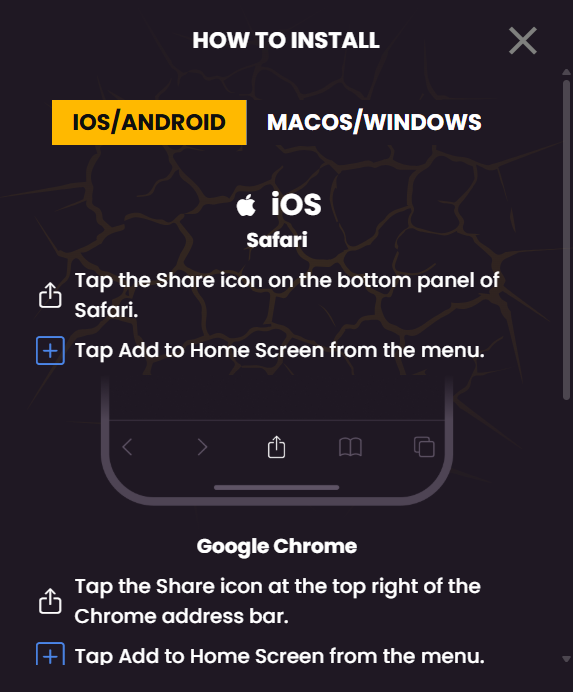
iOS PWA installation works only from Safari — Chrome on iOS does not yet support "Add to Home Screen" for full PWA behaviour. Recommended: iOS 13 or higher; iOS 15+ for best UX.
- Open Safari (not Chrome) and go to wildtokyo.com.
- Tap the Share button (the square with the arrow pointing up) at the bottom of the screen.
- Scroll the share sheet and tap Add to Home Screen.
- Confirm the name (default: "Wild Tokyo") and tap Add in the top-right corner.
- Open Wild Tokyo from your home screen — it now launches fullscreen, like an app.
How to Install Wild Tokyo on Android (Step-by-Step)
Android PWA install works in Chrome, Edge and Samsung Internet. Recommended: Android 8 or higher; Android 10+ for best UX. On many modern devices, an automatic "Install Wild Tokyo" banner pops up the first time you visit.
- Open Chrome (or Edge / Samsung Internet) and go to wildtokyo.com.
- Tap the menu (three dots) in the upper right corner of the browser.
- Select Install app or Add to Home screen from the menu.
- Confirm the install prompt — Android handles the rest.
- The Wild Tokyo icon appears on your home screen and in the app drawer alongside your other apps.
Note: Samsung Internet may offer a "Secure Folder" install option — keep the default unless you have a specific reason to use it. The PWA appears identical in both locations.
System Requirements & Compatibility
| Requirement | iOS | Android |
|---|---|---|
| Minimum OS | iOS 13 | Android 8 (Oreo) |
| Recommended | iOS 15+ | Android 10+ |
| Push notifications | iOS 16.4+ only | Android 8+ |
| RAM minimum | 2 GB | 2 GB |
| RAM recommended | 4 GB | 4 GB |
| Internet | 3 Mbps slots / 10 Mbps live | 3 Mbps slots / 10 Mbps live |
| Browser | Safari only | Chrome, Edge, Samsung Internet, Firefox |
Not supported: legacy Windows Phone, BlackBerry OS, KaiOS, and very old Android (below 8). Live casino benefits significantly from a stable 10 Mbps connection.
Mobile Game Library — What's Available
The mobile catalogue mirrors desktop almost completely. All 9,000+ slots from desktop run on mobile, live casino works (Evolution Lightning Roulette, Crazy Time and the rest), and Megaways titles are optimised for portrait orientation. Sakura Fortune — the brand's signature Asian-themed slot — runs cleanly in portrait. The only exceptions: a handful of legacy Flash-era slots that no longer run on modern mobile browsers.
Provider lineup on mobile: Pragmatic Play, NetEnt, Play'n GO, Quickspin, Big Time Gaming, Yggdrasil, Evolution (live), Booming Games, NoLimit City and the rest of the desktop roster.
Mobile Features — What the PWA Adds
- ✅ Push notifications for bonuses (iOS 16.4+, Android 8+) — opt-in only
- ✅ Biometric login via Face ID, Touch ID or fingerprint after first sign-in
- ✅ Apple Pay / Google Pay for deposits where the underlying processor (Stripe / Trustly) supports it
- ✅ Fullscreen mode with no browser bar, just like a native app
- ✅ Offline screen when no internet is available (game sessions still need a connection)
- ✅ One-tap launch from the home screen
Mobile Login & Sign Up
Login and registration on mobile are identical to desktop. After your first sign-in, biometric login lets you re-enter with Face ID, Touch ID or fingerprint. KYC can be completed entirely from your phone: take photos of your ID and proof of residence with the camera and upload directly. New to Wild Tokyo? See our complete login and signup guide.
Bonuses on Mobile
Every desktop bonus runs identically on mobile: the welcome bonus (100% up to C$1,500 + 200 FS), Loyalty Shop, Monday Cashback and weekly reloads all behave the same. Wagering requirements (35x) are unchanged. Push notifications about new promotions are opt-in. Full bonus terms and the live offer list live on our bonus page.
PWA vs Mobile Browser — When to Choose Which
PWA install
- Pros
- One-tap launch
- Fullscreen, no URL bar
- Biometric login
- Push notifications
- ~2 MB on device
Best if you play 2+ times a month.
Mobile browser
- Pros
- No install needed
- Same game library
- Same bonuses
- Type URL each time
- Browser bar visible
Fine for occasional sessions.
Recommendation
- 2+ sessions/month → PWA
- Occasional only → browser
- Want push notifications → PWA
- iOS 16.4+ → PWA worth it
- Older device → browser
Pros & Cons of Mobile Wild Tokyo
Pros
- Full 9,000+ game library available on mobile
- Instant launch from home screen
- Biometric login (Face ID, Touch ID, fingerprint)
- Apple Pay / Google Pay where the processor supports it
- ~2 MB storage footprint vs 50+ MB native apps
- Auto-updates without App Store push
Cons
- No App Store / Play Store presence (psychological barrier for some)
- iOS PWA install requires Safari, not Chrome
- A handful of legacy Flash slots no longer run on mobile
- Push notifications on iPhone need iOS 16.4+
- Live game sessions still require an internet connection
Troubleshooting — Common Mobile Problems
"Add to Home Screen" doesn't appear on iPhone
You're probably in Chrome. Switch to Safari — only Safari supports the full PWA install on iOS.
A slot won't load on mobile
Clear the browser cache: Settings → Safari (iOS) or Chrome menu → Settings → Privacy → Clear browsing data. Then reload Wild Tokyo.
Biometric login isn't working
Check site permissions: Safari / Chrome → Site Settings → Biometrics → Allow. Then sign in once with email and password to register the device.
Push notifications never arrive
Check your iOS version — push needs iOS 16.4+. On Android, check Settings → Apps → Chrome → Notifications → On.
Apple Pay / Google Pay isn't an option at deposit
Try a different payment method — Apple Pay / Google Pay availability depends on the underlying processor (Trustly, Stripe). It is not enabled for every region.
A slot is laggy or stutters
Close background apps to free RAM. Live casino in particular benefits from at least 4 GB RAM and a 10 Mbps connection.
The Wild Tokyo icon disappeared from my home screen
Reinstall the PWA: open wildtokyo.com in Safari (iOS) or Chrome (Android) and run the install steps again. Your account and KYC remain intact.
FAQ — Wild Tokyo App
Is there a Wild Tokyo Casino app?
Where can I download Wild Tokyo?
Is the Wild Tokyo APK on apkpure safe?
Does the mobile version have all games?
Can I claim bonuses on mobile?
Does the Wild Tokyo PWA work offline?
How much storage does the PWA take?
Can I use Apple Pay or Google Pay?
Is Wild Tokyo mobile safe?
How do I uninstall the Wild Tokyo PWA?
Verdict — Bottom Line on Wild Tokyo Mobile
★★★★☆ 4.0 / 5 for mobile experience
Wild Tokyo's PWA-only approach is a fair compromise given the App Store / Play Store gambling restrictions. It suits mobile-first players on iOS 13+ or Android 8+ who don't mind installing through the browser. It doesn't suit anyone who insists on App Store / Play Store presence as a trust signal, or owners of very old devices.
Install Now (60 seconds) → 18+ (19+ in ON, QC, MB, SK, NB, NL, NS, PE, YT). T&Cs apply. Wild Tokyo is licensed under Curaçao eGaming.